What Is a Good Typing Speed? WPM Benchmarks Explained
Learn what counts as a good typing speed, how WPM benchmarks compare across professions and exams, why accuracy trumps raw speed, and how to improve your WPM.

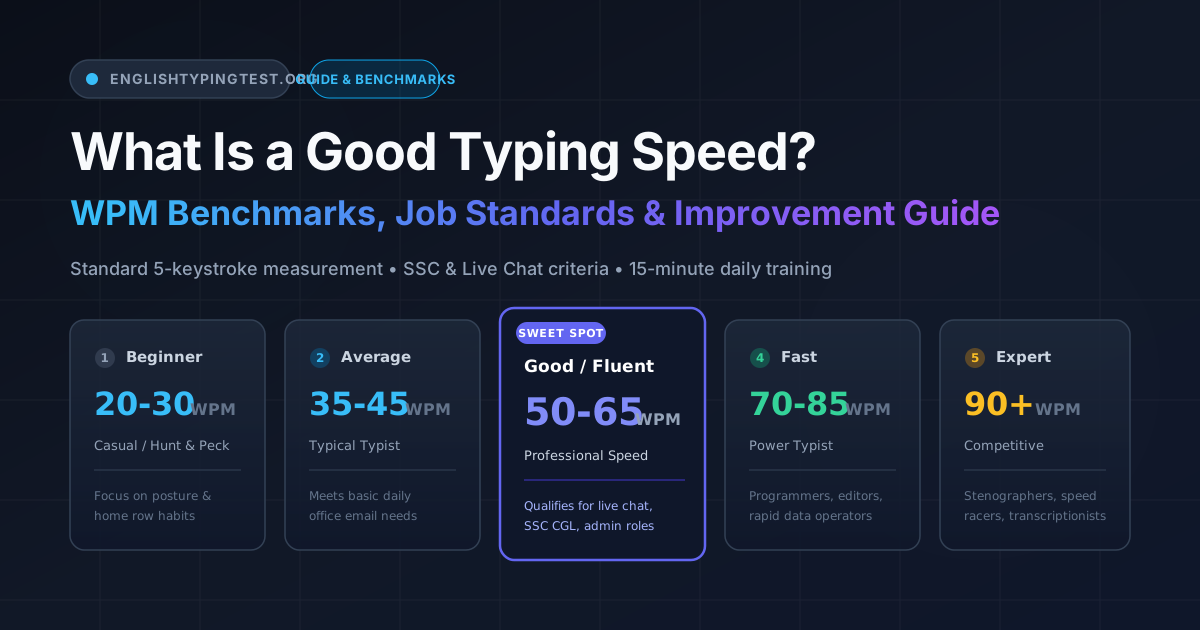
Whether you are applying for an administrative position, preparing for competitive government examinations like SSC CGL or GCC-TBC, or simply trying to get through daily work emails faster, one question comes up constantly: what is a good typing speed?
The short answer: for general office work, a speed between 40 and 50 Words Per Minute (WPM) with at least 95% accuracy is considered good and productive. If your work involves real-time customer service or live chat support, employers generally expect 50 to 65 WPM. Professional transcriptionists and legal secretaries often operate at 70 to 90+ WPM.
However, looking at words per minute in isolation can be misleading. A typist clocking 80 WPM with an 88% accuracy rate often produces less usable output than someone typing at 55 WPM with 98% accuracy. In this guide, we break down standardized WPM measurement formulas, realistic benchmark tiers, job-specific thresholds across the United States and India, and a practical 15-minute daily training plan to help you improve.
1. How Typing Speed Is Actually Calculated
Before evaluating whether your speed is good, it helps to understand how modern typing engines measure your performance.
The Universal 5-Keystroke Standard
In computing and typography, words vary drastically in length—typing "an" takes two keystrokes, while "characteristically" requires seventeen. To establish a fair, standardized unit of measurement across different languages and test passages, international standards define one standardized word as exactly five keystrokes (including letters, punctuation, numbers, and spaces).
💡 Standardized Word Formula:
1 Standard Word = Exactly 5 Keystrokes (including letters, spaces, and punctuation)Standard Words = Total Keystrokes ÷ 5
Gross WPM vs. Net WPM
Typing tests typically calculate two distinct metrics:
⚡ Gross WPM (Raw Speed):
Gross WPM = (Total Keystrokes ÷ 5) ÷ Time (in minutes)
Measures raw keystroke velocity, ignoring errors.
🎯 Net WPM (Actual Production Speed):
Net WPM = Gross WPM − (Uncorrected Errors ÷ Time in minutes)
Deducts uncorrected errors to reflect true usable output.
Practical Calculation Example:
If you type 300 characters in 1 minute with 4 uncorrected errors:
- Gross WPM: (300 ÷ 5) ÷ 1 = 60 WPM
- Net WPM: 60 − (4 ÷ 1) = 56 Net WPM
Our test engine at EnglishTypingTest.org uses these exact standardized formulas so that your results match formal employer screenings and testing agency criteria.
WPM vs. CPM and KDPH
Depending on your region and target exam, you may encounter different units:
- WPM (Words Per Minute): Standard across the US, UK, and modern tech workplaces.
- CPM / KPM (Characters or Keystrokes Per Minute): Directly proportional to WPM (
1 WPM = 5 CPM). - KDPH (Key Depressions Per Hour): Used extensively in Indian government recruitment exams (e.g., Staff Selection Commission).
🏛️ Indian Government Exam Conversion:
• 8,000 KDPH requirement:8,000 ÷ 60 = 133.3 CPM→133.3 ÷ 5 ≈ 26.7 WPM
• 10,500 KDPH requirement:10,500 ÷ 60 = 175 CPM→175 ÷ 5 = 35 WPM
2. Realistic Typing Speed Benchmarks
While individual typing speeds exist on a continuous spectrum, the following tiers provide realistic reference ranges based on broader population data and empirical research (such as the large-scale ACM CHI 2018 study by Dhakal et al., which analyzed 168,000 typists):
| Level | WPM Range | Accuracy Target | Who Fits Here? | Real-World Context |
|---|---|---|---|---|
| Beginner | 20 – 30 WPM | 85% – 90% | Hunt-and-peck typists, young learners | Frequent pauses; looking down at fingers; cognitive friction during writing |
| Average | 35 – 45 WPM | 92% – 95% | Typical computer users, students | Suitable for everyday tasks, emails, search queries, and casual browsing |
| Good / Fluent | 50 – 65 WPM | 95% – 98% | Office professionals, chat agents, writers | Clean touch typing; fingers move automatically without looking down |
| Fast / Advanced | 70 – 85 WPM | 97% – 99% | Programmers, editors, paralegals | Keystrokes keep pace with rapid thoughts; minimal backspacing |
| Expert / Pro | 90+ WPM | 98%+ | Court stenographers, competitive racers | Top 1% of computer users; specialized finger dexterity and rhythm |
Note: These benchmarks serve as practical general reference ranges. Official certifications and job requirements may enforce specific minimum thresholds and error deduction formulas.
3. What Different Typing Speeds Feel Like in Daily Practice
To understand where your current speed lands, consider how each tier feels during normal computer work:
30 WPM: The "Hunt & Peck" Barrier
At 30 WPM, you are likely looking down at the keyboard frequently. You pause between sentences to locate punctuation keys or numbers. Composing a 500-word document takes about 17 to 20 minutes of continuous input, and the act of typing itself draws cognitive attention away from what you are composing.
40 WPM: The Everyday Baseline
Around 40 WPM, you have developed partial muscle memory for frequently used letter sequences like -ing, -tion, and the. You can keep up with casual workplace communication, but real-time tasks like live customer chat or taking notes during a fast meeting feel hurried.
50 WPM: The Touch Typing Milestone
At 50 WPM, you rarely look at the keyboard. Your fingers automatically return to the home row (A, S, D, F and J, K, L, ;). You can listen to someone speak and record their core thoughts without falling significantly behind.
60 WPM: Professional Fluidity
At 60 WPM, typing matches natural speaking speed in conversational writing. You can draft an entire email, code documentation, or report while focusing 100% on the argument or structure rather than the mechanics of the keys.
80 WPM: High-Velocity Rhythm
Typing at 80 WPM feels rhythmic and effortless. You perceive words as complete physical gestures rather than individual letters. Programmers and high-volume data workers at this speed capture thoughts instantaneously.
4. The Accuracy Paradox: Why Fast Typists Often Finish Slower
A common misconception among beginner and intermediate typists is that typing faster simply means moving fingers more aggressively. In reality, errors carry a heavy time penalty that destroys net speed.
The Backspace Penalty
Consider what happens when you make a single typo:
- You notice the incorrect character on the screen (visual confirmation lag: ~200–300 ms).
- You stop your forward finger momentum.
- Your pinky stretches up to the Backspace key.
- You press Backspace once or multiple times.
- You re-read the target word to regain your place.
- You re-type the character and resume rhythm.
A single error costs between 1.5 and 2.5 seconds of forward productivity. If you make 6 errors in a 1-minute test, you lose 9 to 15 seconds of productive typing time just correcting mistakes.
⚠️ The Real-World Cost of Accuracy:
• 80 WPM at 88% Accuracy: After backspace stops and typo penalties ≈ 52 Net Usable WPM
• 60 WPM at 98% Accuracy: Continuous rhythm with near-zero corrections ≈ 58 Net Usable WPM (Winner)
Prioritizing accuracy over speed produces higher net productivity, less mental fatigue, and fewer wrist strains.
5. Job & Exam Requirements: United States & India
Different occupations and competitive exams enforce distinct speed and accuracy standards.
Employment Benchmarks (US & Global)
- Administrative Assistant & Executive Support: 40 – 50 WPM (95%+ accuracy). Administrative roles require steady, clean documentation and correspondence.
- Customer Support & Live Chat Specialist: 50 – 60 WPM (95%+ accuracy). Chat agents frequently handle 2 to 3 simultaneous customer conversations; slow typing leads to long response delays. You can test your readiness on our Live Chat Typing Test.
- Medical Transcription & Legal Scopes: 65 – 85+ WPM (98%+ accuracy). Highly specialized medical and legal terminology demands near-zero margin for error.
- Data Entry Clerk: 45 – 55 WPM, often tested on numeric keypad (10-key) entry at 8,000 to 10,000 Key Depressions Per Hour.
Indian Government & Public Sector Exams
India conducts some of the most rigorous standardized typing evaluations in the world:
- Staff Selection Commission (SSC CGL & CHSL): Candidates take a 15-minute Data Entry Speed Test (DEST). The standard requirement is 2,000 keystrokes in 15 minutes (roughly 26.7 WPM) for certain posts and 35 WPM (10,500 KDPH) for Data Entry Operator positions. Mistakes must remain below specified cutoffs (typically 5% to 7% for unreserved categories). Prepare with our dedicated SSC CGL Typing Test.
- GCC-TBC (Government Commercial Certificate): Common in Maharashtra and other state technical boards, assessing candidates at 30 WPM (basic) and 40 WPM (advanced) with strict evaluation of formatting and speed. Practice on the GCC-TBC Typing Test.
- High Court & District Court Clerks: Often require 35 to 40 WPM in English with strict penalties for spelling mistakes and missed words.
6. A 15-Minute Daily Routine to Increase Speed by 15–20 WPM
You do not need to practice for hours every day to make noticeable progress. A focused, structured 15-minute routine consistently outperforms sporadic marathon sessions.
Daily 15-Minute Training Breakdown:
[00:00 - 03:00] Warm-Up: Finger placement & home row orientation
[03:00 - 08:00] Accuracy Drills: Slow, deliberate input (target 98%+)
[08:00 - 12:00] Real-World Simulation: Full paragraphs with punctuation
[12:00 - 15:00] Speed & Reflex Burst: Games or race challenges
Phase 1: Warm-Up (Minutes 0–3)
- Sit upright with feet flat on the floor.
- Feel for the tactile bumps on the F and J keys to anchor your index fingers.
- Complete a short exercise in our Typing Lessons to wake up finger joints without watching the clock.
Phase 2: Accuracy Drill (Minutes 3–8)
- Take two 1-Minute Typing Tests.
- The Golden Rule: Type at 80% of your maximum speed. Do not rush. Make your rhythm as steady as a metronome. If you make a mistake, do not panic or speed up—stay calm and continue.
- Target: 98% accuracy or higher.
Phase 3: Real-World Text Simulation (Minutes 8–12)
- Move beyond simple word lists. Practice passages containing capital letters, commas, quotation marks, and numbers.
- Try our Live Chat Typing Test or SSC CGL Typing Test to get used to multi-line paragraph flow and realistic exam formatting.
Phase 4: Reflex & Speed Burst (Minutes 12–15)
- End your session with a high-energy speed drill.
- Jump into Typing Games or challenge live opponents in Race Mode. This trains your brain to react quickly under time constraints while keeping your practice fun.
7. Ergonomic Adjustments for Sustainable Speed
Physical tension is one of the biggest hidden speed limiters. Making small adjustments to your workspace can instantly release hand fatigue:
- Floating Wrists: Never rest your wrists heavily against the desk or laptop edge while actively typing. Doing so pinches the median nerve and restricts finger mobility. Keep wrists neutral and hovering slightly above the keyboard.
- Elbow Angle: Position your chair so your forearms rest at roughly a 90-degree angle to your upper arms.
- Key Bottoming: Modern membrane and mechanical keyboards actuate before the key reaches the bottom of its travel. Avoid pounding keys with excessive force; a lighter stroke preserves stamina.
- Lighting & Display: Keep your display at eye level so your head does not drop forward, reducing neck strain during long typing sessions.
8. Frequently Asked Questions (FAQ)
What is considered an average typing speed worldwide?
Across the general global population of computer users, the average typing speed is approximately 38 to 42 Words Per Minute (WPM) with an accuracy rate around 92%. Experienced touch typists who use all ten fingers typically average between 50 and 65 WPM.
Is 40 WPM fast enough for an office or remote job?
Yes. For most standard administrative, sales, customer care, and managerial positions, 40 to 45 WPM is completely sufficient. What matters most to employers is accuracy (at least 95%) and the ability to produce clean, professional documents without constant spelling corrections.
How does EnglishTypingTest.org calculate WPM and accuracy?
EnglishTypingTest.org follows international standard metrics: one standardized word equals 5 keystrokes (including spaces and punctuation). Gross WPM is calculated as (Total Keystrokes ÷ 5) ÷ Time (in minutes). Net WPM subtracts uncorrected errors. Accuracy is the percentage of correct keystrokes out of total attempted keystrokes. For full implementation details, visit our Measurement Methodology page.
Why does my typing speed drop sharply when numbers and symbols appear?
Most users practice alphabetical words far more often than numeric or punctuation keys. Because numbers (1–0) and special symbols (@, #, $, %, &, *) are located on the top number row, your fingers have to travel farther from the home row. Practicing dedicated number row exercises in our Typing Lessons will quickly close this gap.
How long does it take to increase typing speed from 30 WPM to 60 WPM?
With consistent daily practice of 15 to 20 minutes, most learners progress from 30 WPM to 50–60 WPM within 4 to 8 weeks. The key is transitioning from 2-finger hunt-and-peck to full 10-finger touch typing, focusing on accuracy first before attempting to speed up.
Can I pass the SSC CGL typing test if I type 32 WPM?
Yes, provided your accuracy is exceptional. The SSC CGL DEST requirement is 2,000 keystrokes in 15 minutes, which equates to roughly 26.7 WPM. However, because exam hall keyboards may feel unfamiliar and anxiety can cause errors, we strongly recommend building a comfortable cushion of 35 to 40 WPM during practice tests on our SSC CGL Typing Test module.
Next Steps: Test Your Current Baseline
Knowing your baseline speed is the first step toward improving it. Take our free, distraction-free typing assessment today:
- Take the Standard Typing Test
- Practice Touch Typing Lessons
- Challenge Other Typists in Race Mode
- Learn About Our Calculation Methodology
About the Author
Firoz Khan is a Full Stack Developer and the founder of FK Digital Media. He created EnglishTypingTest.org to provide students, job seekers, and developers with transparent, privacy-first typing tools and accurate performance telemetry. All calculations and guides on this site adhere to our public Editorial Policy.
Full Stack Developer and founder of FK Digital Media. Creator and lead developer of EnglishTypingTest.org.